Taptap Send Review: Best USD to INR Rate Compared
Advertiser disclosure: this article includes a referral link. If you sign up through it, we may earn a reward. That does not change the rates we report.
If you live in the US and support family in India, the exchange rate you get matters more than almost anything else. A difference of half a rupee per dollar adds up quickly over a year of transfers. This guide covers what Taptap Send is, how it works, and how its rate compared with other popular options.
What is Taptap Send?
Taptap Send is a mobile-first international money transfer service. According to its public company profile, it was founded in 2018 and is based in London. It operates in the US, UK, EU, Canada, UAE and Australia, and sends to dozens of countries.
It is a licensed money transmitter. Its regulatory licenses page lists money transmission licenses across most US states, plus authorization or registration in the UK, EU, Canada, Dubai and Australia. For US senders, this means the service is regulated, but you should still read the license page and terms yourself before sending money.
For India, Taptap Send supports transfers to bank accounts and to UPI IDs.
How a transfer works
- Download the app and create an account.
- Verify your ID. The app confirms when your documents are approved.
- Enter the amount in USD. The app shows the exchange rate, the fee and the rupees your recipient gets before you confirm.
- Choose how the money is delivered, for example to a bank account or a UPI ID.
- Pay from your US bank account or other supported method, and send.
Why people choose it
- A clear, flat fee. On the transfers I checked, the fee was $1.99, shown before sending.
- A competitive rate. Taptap Send showed the highest USD to INR rate in my comparison (below).
- Fast delivery. UPI transfers reached the recipient within minutes in my experience.
- Everything is shown up front. The rupee amount the recipient will receive is displayed before you confirm.
Rate comparison: $100 sent to India
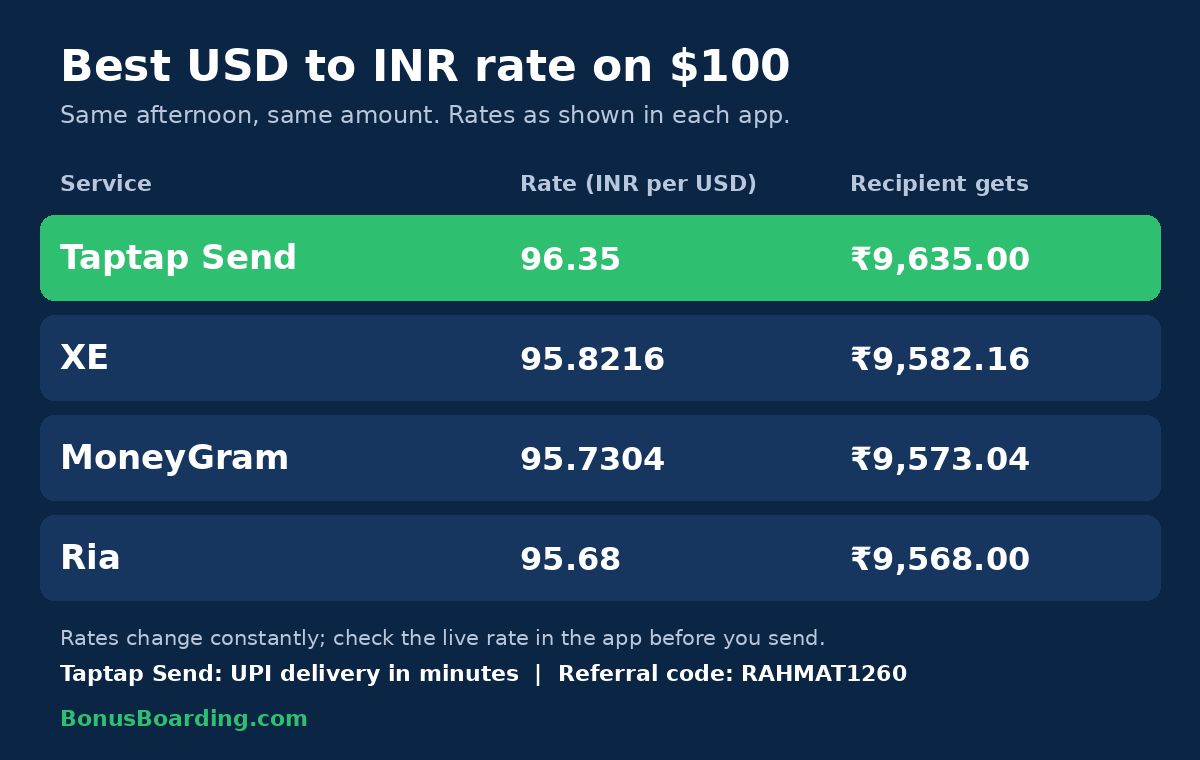
I opened four apps on the same afternoon and entered the same $100 amount. Here is what each one showed.
| Service | Rate (INR per USD) | Recipient gets (on $100) |
|---|---|---|
| Taptap Send | 96.35 | ₹9,635.00 |
| XE | 95.8216 | ₹9,582.16 |
| MoneyGram | 95.7304 | ₹9,573.04 |
| Ria | 95.68 | ₹9,568.00 |
Taptap Send showed the highest rate of the four. On $100 it delivered ₹53 more than XE, ₹62 more than MoneyGram and ₹67 more than Ria, and the gap grows with the amount: on $1,000 it is roughly ₹530, ₹620 and ₹670. Taptap Send, MoneyGram and Ria each showed a $1.99 fee on the transfer.
Speed is competitive too. Taptap Send UPI transfers reached the recipient within minutes, and XE and the others can also be fast when you pay by debit card.
Rates move during the day, and the figures above are a snapshot. Check the live numbers on the day you send.
Get a $10 bonus on your first transfer
New customers can get a $10 bonus on their first transfer when they sign up with a referral code. Use code RAHMAT1260, or sign up with this link:
https://taptapsend.onelink.me/Lrab/appreferral
The bonus has conditions, such as a minimum send amount, set by Taptap Send, and they can change. Read the offer terms in the app before you send.
Who it suits
- People who send money to India regularly and want a strong rate.
- Anyone who wants UPI delivery in minutes.
- Senders who prefer a flat, visible fee.
Who should compare first
- People sending very large amounts, where even small rate differences matter a lot.
- Anyone who needs cash pickup rather than a bank or UPI deposit.
- Anyone paying by a method that adds its own charges.
Bottom line
On the afternoon I checked, Taptap Send offered the best USD to INR rate of the four services I compared, with a flat $1.99 fee and UPI delivery within minutes. If you send money to India often, it is worth trying: use code RAHMAT1260 for the new-customer bonus, then check the live rate on your own amount before you send.
This article reflects one person’s comparison and is not financial advice. Rates, fees and offers change; confirm current terms with each provider.
Keep reading
- Credit for Immigrants
From Zero to 'Good' Credit: A Sequencing Guide for US Newcomers
No SSN yet? Thin file? Here's the exact card sequence H-1B, F-1, and new immigrants should follow to build a real US credit score fast.
- Credit for Immigrants
Credit Cards for Immigrants: H-1B, F-1, and Green Card Holders
How to get approved for credit cards as an immigrant — including which cards accept ITINs and alternatives to a Social Security number.
- Credit for Immigrants
ITIN credit cards in 2026: Capital One vs the fintech challengers
A head-to-head of the cards newcomers can actually get with an ITIN — Capital One's secured pair vs Zolve, Self, and Firstcard.
Join the discussion
Share your take, ask a question, or swap tips with other readers. Be kind — we moderate.